

- 6.4
Key Points
- Add a watermark to EOW sessions
- Support for desktop and application modes
- Support for all access methods (web, native, mobile)
- Customizable watermark
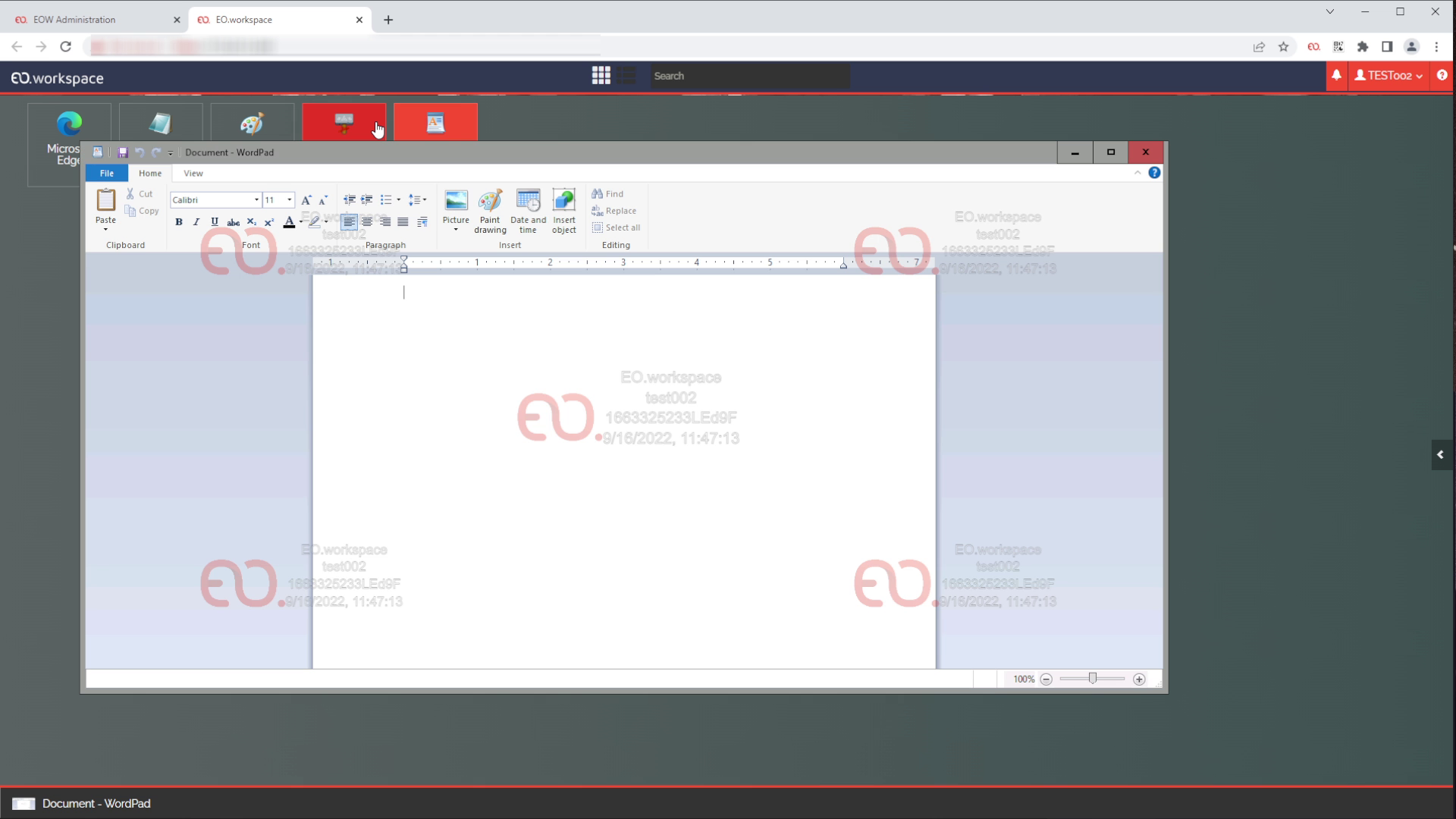
Overlay a watermark on any EO.workspace (EOW) session, on every client and access method, so every screenshot or photo is recognizable.
EOW allows administrators to display a watermark image over the user’s session, ensuring that any visual reproduction of the session through screenshots or photos can be identified and traced back to a specific user and session.
The administrator can choose the transparency of the watermark image and which of the following elements should be included:
- Organization logo;
- Organization name;
- Username;
- Session ID;
- Date and time;
- Custom text.


Recommended For You

CIS Virtualizes Bank Branches
CIS Virtualizes Bank Branches

NOS Virtualizes Critical Applications
NOS Virtualizes Critical Applications

CHBV Reduces Workstation Costs